Staff guide
Inventory
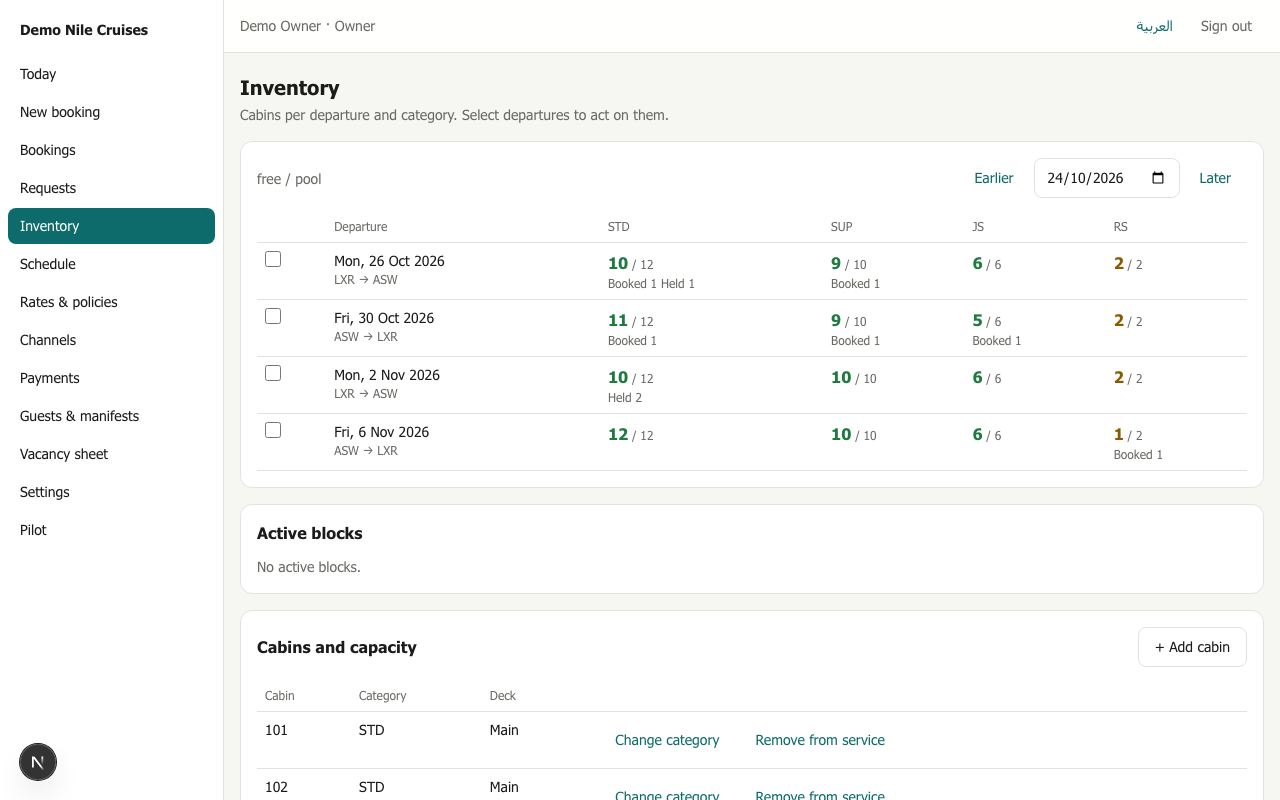
Inventory shows, for each departure (the vessel sailing from one port to the next) and each category, how many cabins are free out of how many in the pool. It also shows how many are booked, held, set aside for agencies (allotted) or blocked. A red badge means sales are stopped.
Acting on departures
Tick one or more departures, then:
| Action | Use it when | What happens |
|---|---|---|
| Block cabins | Cabins are out of use for maintenance or kept for a group | That many free cabins are taken off sale. Only free cabins can be blocked |
| Emergency block | A cabin breaks while it is already sold | The cabin is taken off sale even if that leaves too few cabins for the bookings. Sales stop on that departure, and the bookings to move appear on Today |
| Stop sale | You want to stop selling for a while | Nothing more can be held or booked there. Existing bookings stay |
| Resume sale | Selling can start again | Sales reopen |
Each action needs a reason, and every action is recorded.
Active blocks lists every block with its dates and reason. Release puts the cabins back on sale.
Cabins and capacity
The Cabins and capacity list shows each physical cabin with its category and deck. Owners and reservations can:
- add a cabin from a given departure date onwards;
- change a cabin's category, for example after a refit;
- take a cabin out of service.
If a change would leave too few cabins for bookings already taken, Riverdesk refuses it and names the departures concerned.